
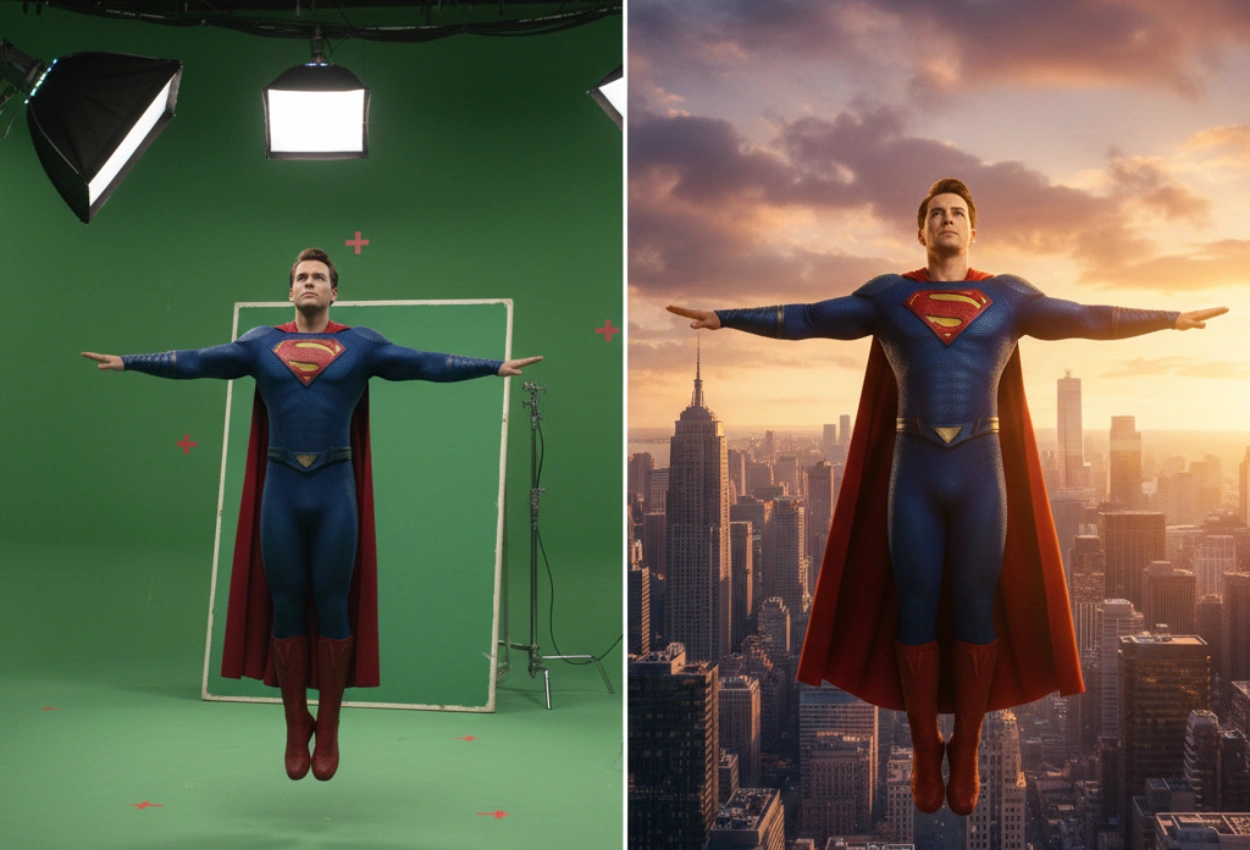
Green Screen Remover Explained: Professional Techniques Used by Motion Effects
For anyone, making a film can be a stressful job. But it’s the passion that drives people to recreate their imagination on the big screen. This imagination requires technology to execute the final outcome. That is why green screen remover technology plays a crucial role behind every fantasy or out-of-this-world shot. It is the backbone of modern filmmaking, advertising, and digital content creation. To achieve a cinematic result, a detailed technical process is required. At Motion Effects, our skilled green screen background editor works with professionally specified workflows to transform raw footage into believable cinematic scenes with precision, visual consistency, and engaging storytelling.
Let’s understand step by step how Motion Effects’ experts remove green screens from videos.
Steps Followed in the Green Screen Remover Process
1. Clean Matte Extraction
Experts employ sophisticated green screen remover tools to isolate the subject while maintaining fine details like hair, transparent fabric, and motion blur. The Motion Effects editor carefully modifies color ranges, edge softness, and tolerance levels to prevent harsh outlines. It is where amateur edits frequently fall short, either by eliminating crucial details or leaving green edges behind.
2. Rotoscoping to Manage Complex Motion
In some shots, manual intervention is necessary when there is rapid movement, flowing clothing, or overlapping objects. That is why rotoscoping is essential in this situation. Our editors maintain accuracy by fine-tuning masks surrounding the subject frame by frame. This step ensures that even in high-action or emotionally charged scenes, the subject appears clear and convincing after removing the green screen from the video.
3. Color Neutralization and Green Spill Suppression
Green spill is one of the most frequent problems with green screen footage. It happens when green light bounces off clothing, skin, or hair. To eliminate undesired green tones without compromising natural skin tone or costume details, spill suppression techniques are used by a professional green screen background editor. Professional workflows perform better than automated tools because of this subtle correction, which is essential for realism.
4. Perspective Matching and Background Integration
The true artistry starts while removing the green background. Motion Effects integrates the subject rather than just adding a new image behind it. Editors match lighting direction and intensity, shadow placement, camera depth, focus, and environmental perspective to create a complete aesthetic frame in the scene. By taking this step, the subject feels rooted in the scene rather than floating erratically.
5. Camera Alignment and Motion Tracking
The background has to move along with the original camera. Editors can synchronize live-action camera movement with digital backgrounds thanks to motion tracking. The green screen remover workflow ensures that CGI or background plates react organically to pans, tilts, and handheld motion by tracking points in the video, preserving visual continuity throughout the shot.
6. Color Grading and Scene Polish
Editors use cinematic color tones to unify the entire frame after removing the green screen and compositing. This stage improves mood, emotion, and storytelling by combining subject and background into a single visual language. Even technically sound green screen work can seem disjointed without appropriate grading.
Importance of Professional Green Screen Editing Matters
The green screen remover connects reality and imagination by following these technical processes. Motion Effects green screen background editor adds this level of detail to movies, advertisements, and digital content, giving even basic shots an immersive, upscale feel.
FAQs
1. Can green screen background editing work for films, ads, and social media?
Yes. Films, commercials, YouTube videos, reels, and advertisements all use green screen editing, which calls for various background integration and pacing techniques.
2. How long does professional green screen removal take?
There are scenes in which the subject is in motion, and for that motion, the tracking and rotoscoping process is done, which can take several days. Simple shots will take a few hours.
3. Can green screen removal fix poorly lit footage?
Yes, it is possible to a certain extent. But proper lighting is a must during the shoot for producing clean green screen results.
4. Is rotoscoping always required to remove green screens from video?
Rotoscoping is necessary for shots where automatic keying fails, complex motion, flowing fabric, and hair details, though this isn’t always the case.
5. Why should filmmakers choose professional green screen editing services?
In contrast to automated tools, professional services guarantee flawless visuals, realistic environments, clean edges, appropriate color grading, and cinematic quality.